Mylo Sync
Introduction
Role: founder and sole builder. I owned product strategy, design, and engineering end to end. Type: consumer SaaS plus a B2B partner platform and a Chrome extension. Stack: React, Vite, Tailwind, Express, Supabase, Stripe, Chrome MV3.
Moving is easy to announce and miserable to finish. The box-carrying is over in a day. The address change drags on for weeks: the bank, the utilities, insurance, streaming, the DMV, the post office. That’s 15 to 30 separate logins, each with its own form, and nowhere to see what’s already done.
I built Mylo Sync to make that tail finishable. The core bet was that the value lives in structured data, not screens: capture the new address once, then orchestrate everything downstream. That became a personalized checklist of 108 companies across 11 categories, a browser extension that fills address forms on supported sites, and a partner program that lets realtors and property managers hand the whole thing to clients under their own brand.
I shaped the work around four decisions:
Turn a daunting chore into a 4-step setup wizard that ends with a plan, not a blank page.
Make the checklist a command center for tracking every notification, not a static to-do list.
Kill the most tedious part with an extension that stops you re-typing one address dozens of times.
Treat a white-label partner platform as the distribution channel, with an apartment-deals marketplace to keep users around past move-day.
See it in action
The problem
Moving is a coordination problem disguised as a list of small tasks
I mapped the post-move flow and three friction points kept surfacing.
Finishing an address change means retyping one address across dozens of services with no single place to see what is done.
Scattered effort. There is no canonical list of everyone who has your address. People rediscover it service by service, usually when something breaks.
No source of truth. Without a tracker, updates slip: a missed bill, mail sent to the old place, a lapsed policy.
Grinding repetition. The same street, city, state, and ZIP get typed into dozens of near-identical forms.
And a distribution problem on the business side
Partners had no channel. Realtors and property managers want to give clients a great move experience but have nothing to hand them.
Generic tools are not trusted. A third-party product dilutes a partner’s brand. They need it to feel like theirs.
Supply and demand never met. Movers hunting for apartments and partners with concessions to offer had no shared space.
What I owned
I was the only designer and builder, so every call was mine to make and live with.
Product and UX: the move journey, the onboarding wizard, the checklist as a control center, and the partner dashboard IA.
The browser extension: Manifest V3 architecture, the site-selector system, the generic field-detection heuristics, and the secure session bridge.
The full stack: React and Vite on the front, Express and Supabase on the back, the data model, and Stripe billing for consumer and partner plans.
The marketplace: apartment deals, user-to-partner messaging, and impression and click analytics.
The system: a shared component library (shadcn/ui and Tailwind) that keeps consumer, partner, and admin surfaces consistent.
1. The dataset is the product
The most important decision wasn’t a screen. It was the company taxonomy, the structured data that powers both the checklist and the extension. I hand-curated 108 companies across 11 categories, from government and banking to utilities, insurance, streaming, and travel. Each record carries its category, the direct address-change URL, the domain, and, where supported, the exact CSS field selectors needed to auto-fill that company’s form.
The insight that shaped the roadmap: not every company can be automated equally, so I split the records in two. High-traffic services like USPS, Chase, Bank of America, Netflix, Amazon, and PayPal got hand-tuned selectors and full in-app auto-fill. Everything else got a guided external link. That shipped real value on the services people actually use first, and degraded gracefully everywhere else, instead of waiting until I could support all of them.
The structured 108-company dataset, not any surface, is the real product: it powers both the checklist and the auto-fill.
2. Onboarding: a 4-step wizard
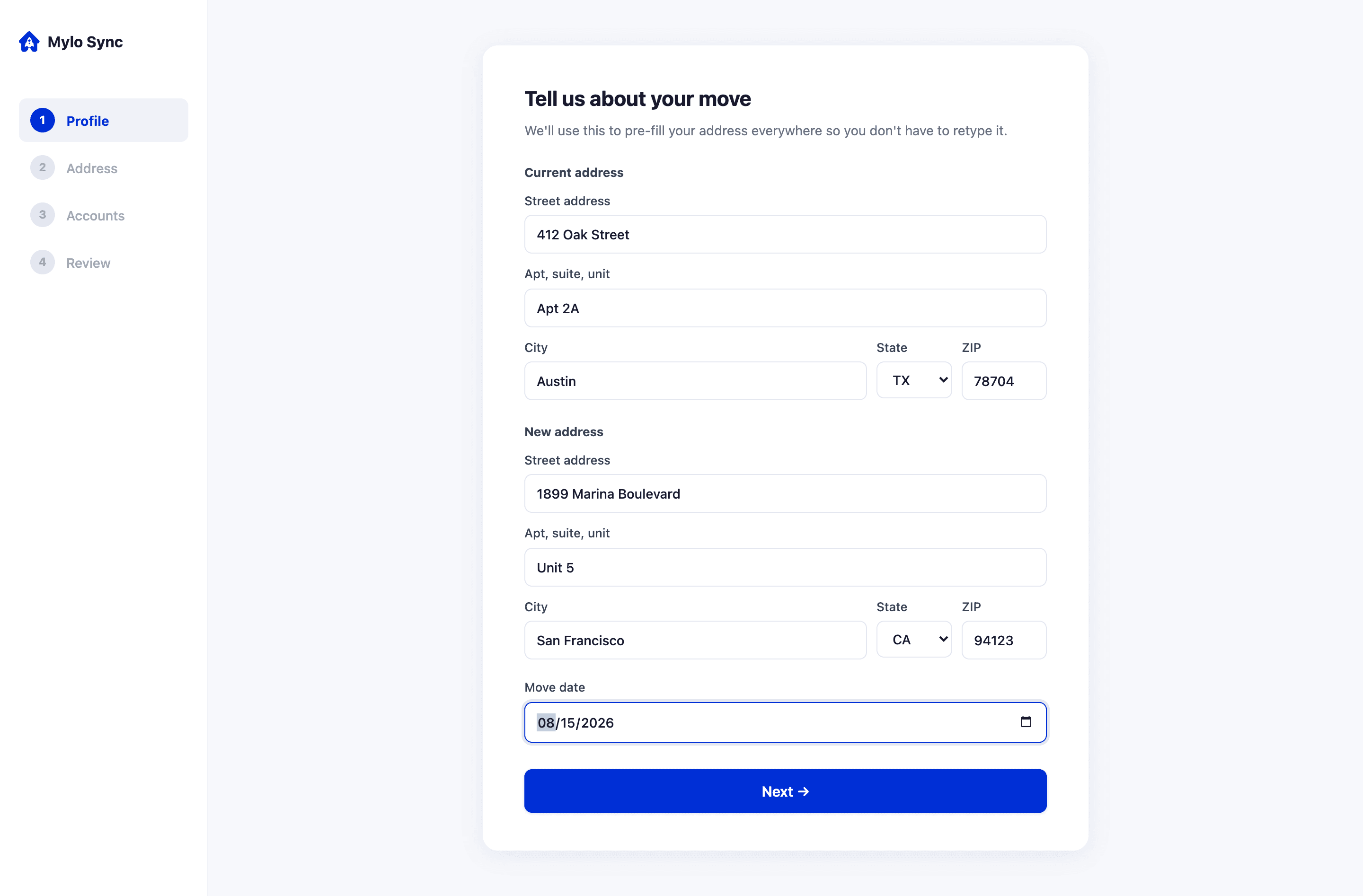
The goal was to get from sign-up to a personalized action plan in minutes, so I kept setup to four steps: enter the current and new addresses (move date optional), confirm them, select accounts from a category-grouped grid with select-all and per-category quick-add, then review and build the checklist.
The decisions behind it:
Let people recognize, not recall. Picking from a known list beats remembering every account from a blank page.
Make the payoff immediate. The moment onboarding ends, a complete personalized checklist already exists.
Bake access into the flow. The build action routes through a subscription gate, but partner-referred and admin users bypass the paywall. The access model is part of the flow, not bolted on after.
3. The checklist: a command center
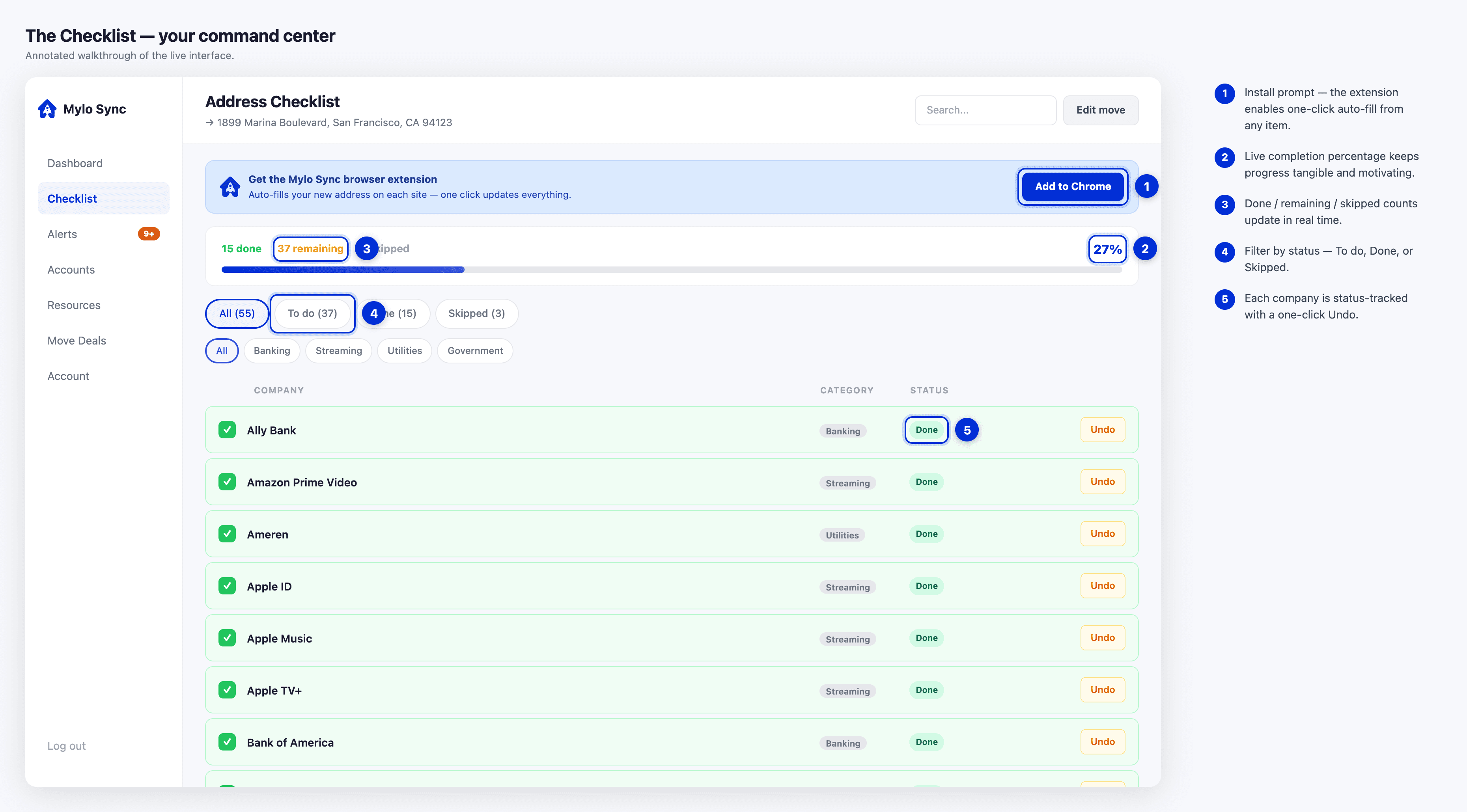
I designed the checklist as the heart of the product: a live control center, not a static to-do list. It has three clear statuses (To do, Done, Skipped), three ways to filter (by status, by category, and free-text search) so someone with 40 items can see exactly what is left, and a visible completion percentage to make progress feel real. Every item links straight to that company’s address-change page and, where supported, hands off to the extension.
The checklist works as a live command center: statuses, filters, and a completion percentage turn a pile of accounts into visible progress.
The feature that makes the promise literal: Batch-Fill
When the extension is installed and items are pending, an Update all action appears. The web app posts a batch-start message to the extension with the queued items. The extension renders an N-of-total guide, walks the user through each company’s form, and auto-fills the address, with a one-click copy-address fallback on fields it cannot fill. On each completion it messages back and the web app marks the item done through the API. That is the whole pitch made concrete: 30 logins become one guided run.
Batch-Fill collapses the whole pending list into one guided run: the extension walks each form, auto-fills the address, and marks every item done.
4. The extension: killing manual entry
A Chrome Manifest V3 extension syncs the user’s address and checklist and fills forms across the web. I built detection in two tiers on purpose.
Tier 1: hand-tuned configs for 11 high-value domains (Chase, Bank of America, Wells Fargo, Netflix, Amazon, PayPal, Google, Microsoft, Apple ID, and both USPS endpoints), including dual-address handling for USPS where the old and new addresses go into separate sections.
Tier 2: generic heuristics for every other site, layering signals to locate fields: autocomplete attributes, name and id matching, aria-label and placeholder matching, a label-text scanner, and combobox detection for single-field address autocompletes.
That split is the difference between supporting 11 sites and working nearly everywhere while staying perfect on the 11 that matter most.
One more decision removed friction: logging into the web app authorizes the extension, with no second login. A content script on the app’s own domain relays the auth token into extension storage over a controlled message channel, so the extension always acts as the logged-in user.
5. Partner platform and marketplace
The B2B side is what turns Mylo Sync from a tool into a distribution channel. I built a white-label partner dashboard across six tabs: Overview, Clients, Deals, Referral Tools, Branding, and Billing.
Client management: invite by referral link or bulk-import by CSV (header-matched email plus optional name), with status filtering and search.
Branding: upload a logo and pick a hex brand color, with live previews of how it renders in the sidebar and on the client’s signup screen.
Embeddable widget: partners can drop Mylo Sync deals straight into their own site.
Tiered gating: bulk import, the widget, and full white-label open up at higher plans.
Apartment-deals marketplace
To keep users engaged past move-day, partners post apartment deals with typed concessions (Weeks Free, Reduced Deposit, Gift Card, Price Reduction, or Special Offer), each with its own badge. Users browse by city, state, or ZIP, save favorites, and message partners in an inquiry thread. I track impression and click analytics per deal, which gives partners real performance data and a featured-for-30-days promotion path.
The deals marketplace keeps users around past move-day: partners post apartment concessions and get per-deal performance data.
How it is priced
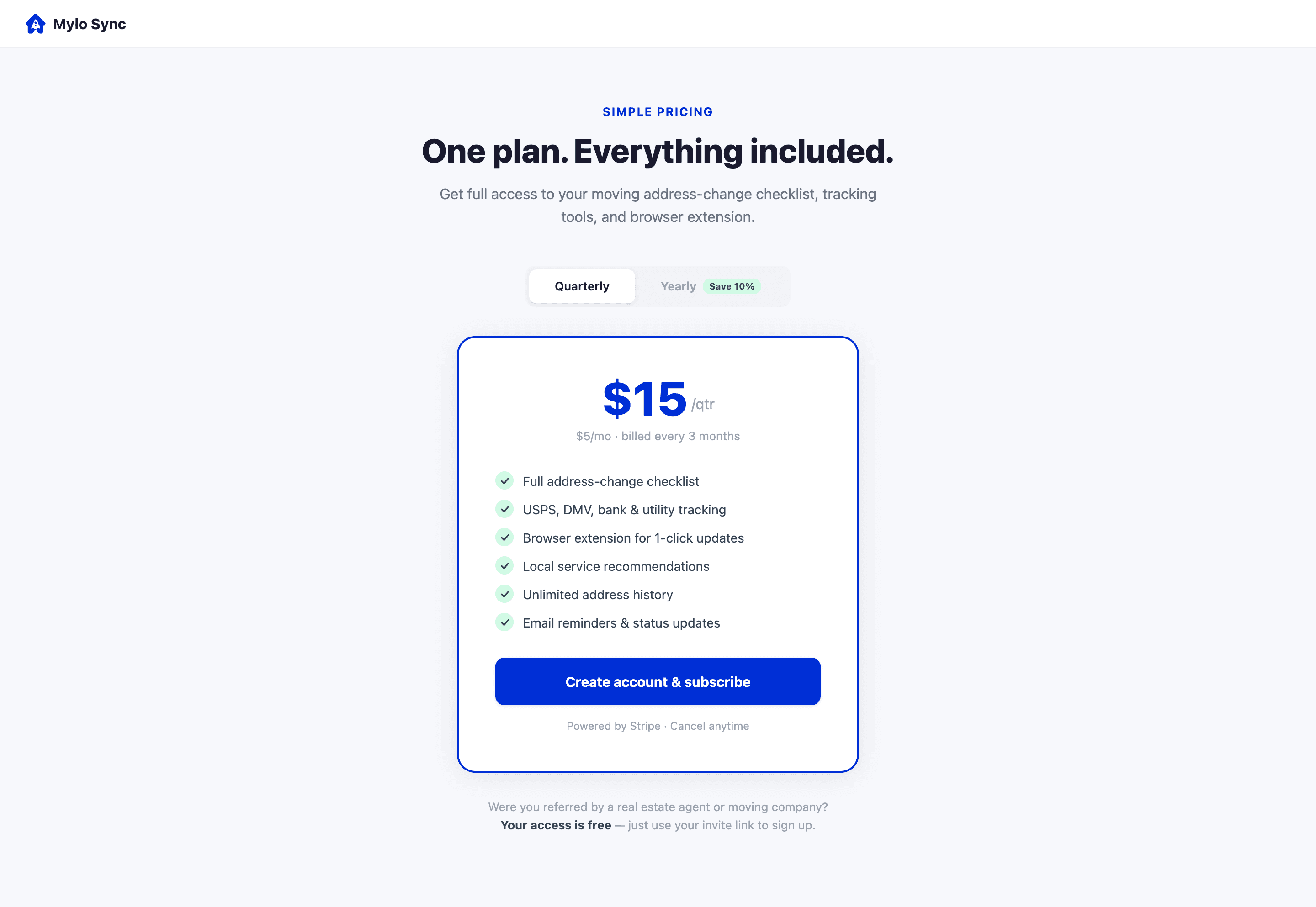
Consumer is $15 per quarter ($5 per month) or $54 per year ($4.50 per month) for the full checklist and extension. Partners choose Starter at $49 per month for 25 clients (referral link and client tracking), Pro at $99 per month for 150 clients (adds CSV import and the embeddable widget), or Business at $199 per month for unlimited clients (adds white-label and a custom domain). Yearly partner billing takes 10% off.
Pricing splits cleanly: a low consumer subscription plus three partner tiers that scale with client count.
6. What I shipped
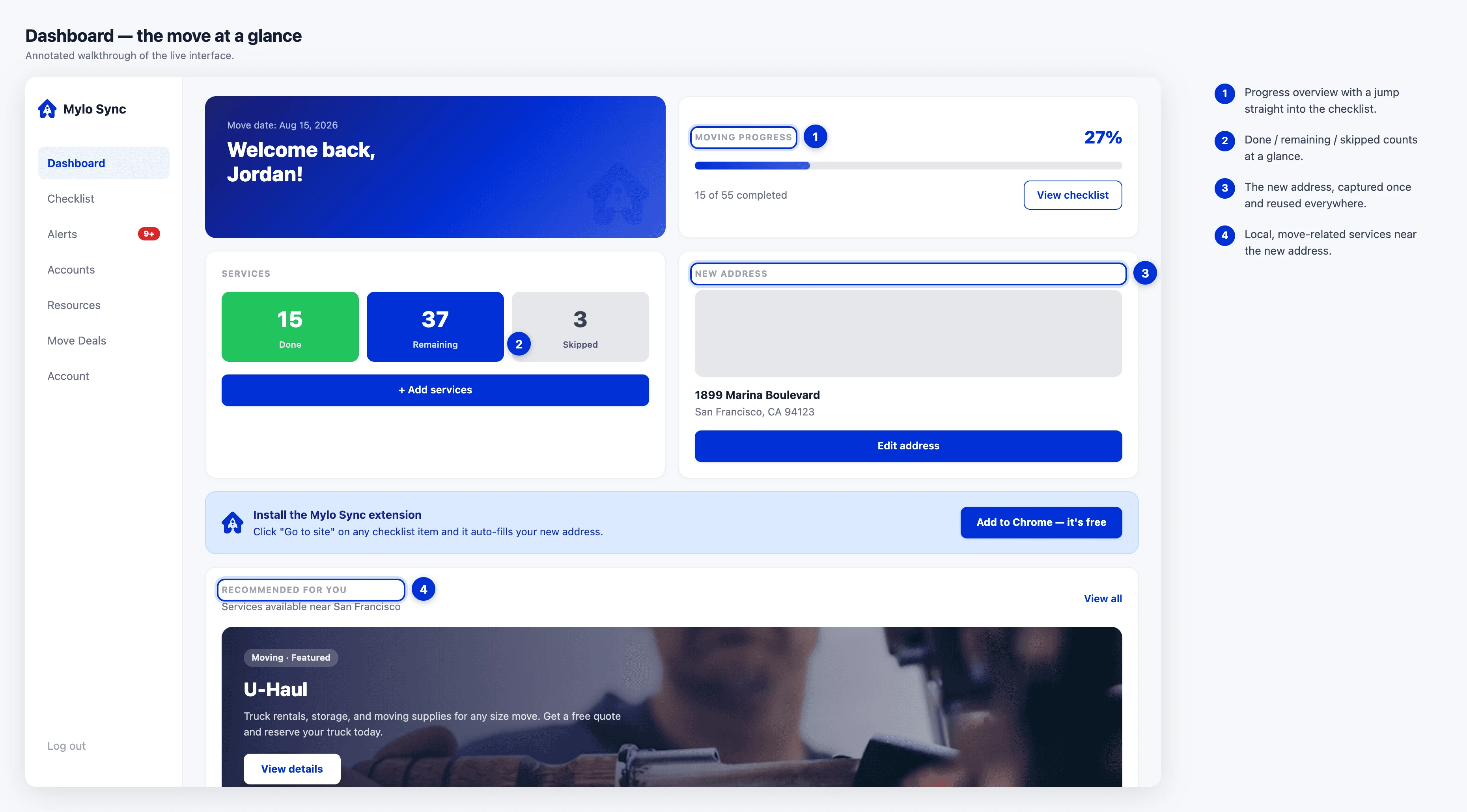
One place instead of thirty. A single dashboard tracks the entire address-change process with live progress.
Automation where it counts. Hand-tuned fills on the highest-traffic services plus a heuristic fallback that works nearly everywhere, with batch mode running the whole list in one guided pass.
A growth loop. The white-label partner program turns realtors and property managers into distribution, and the deals marketplace keeps users around past move-day.
Production-grade foundations. JWT auth (30-day, role-aware tokens), bcrypt password hashing, rate limiting (10 auth attempts per 15 minutes), Helmet security headers, and Stripe billing across consumer and partner plans.
One coherent system. Three audiences (consumer, partner, admin) served from a shared component library and a single data model.
The build, in numbers
These count what I built, not how it is performing. I am keeping that line honest: the figures below describe scope, and the demand numbers are still ahead of me.
108 curated companies across 11 categories.
11 hand-tuned extension site configs, plus unlimited heuristic fallback.
5 deal concession types.
4 user roles: user, partner, admin, and partner-referred.
4 paid plans: one consumer plan plus three partner tiers.
Tech and architecture
Frontend: React 18, Vite, React Router v6, Tailwind, shadcn/ui, Lucide.
Backend: Express 5, Supabase (PostgreSQL), JWT, bcrypt, Stripe.
Extension: Chrome Manifest V3 with content scripts, a service worker, and a message-passing bridge.
Data: a 108-company taxonomy with per-company URLs and auto-fill selectors.
Security: Helmet, CORS allow-listing, rate limiting, and role-based route guards.
Mylo Sync turns the chaos of a move, the dozens of logins and forms and forgotten accounts, into one guided flow you can actually finish. What I haven’t done yet is prove people want it, and that’s the deliberate next step. The figures I’m after are demand ones: sign-ups from movers, the checklist-completion rate once they start, and the first paying partner. Those tell me whether the loop works, and getting the product in front of enough movers and partners to read them is where the project goes from here.